// Projects

1. A VR platform to teach design
2. Education with super powers

A VR platform to teach design

Research
Project Overview
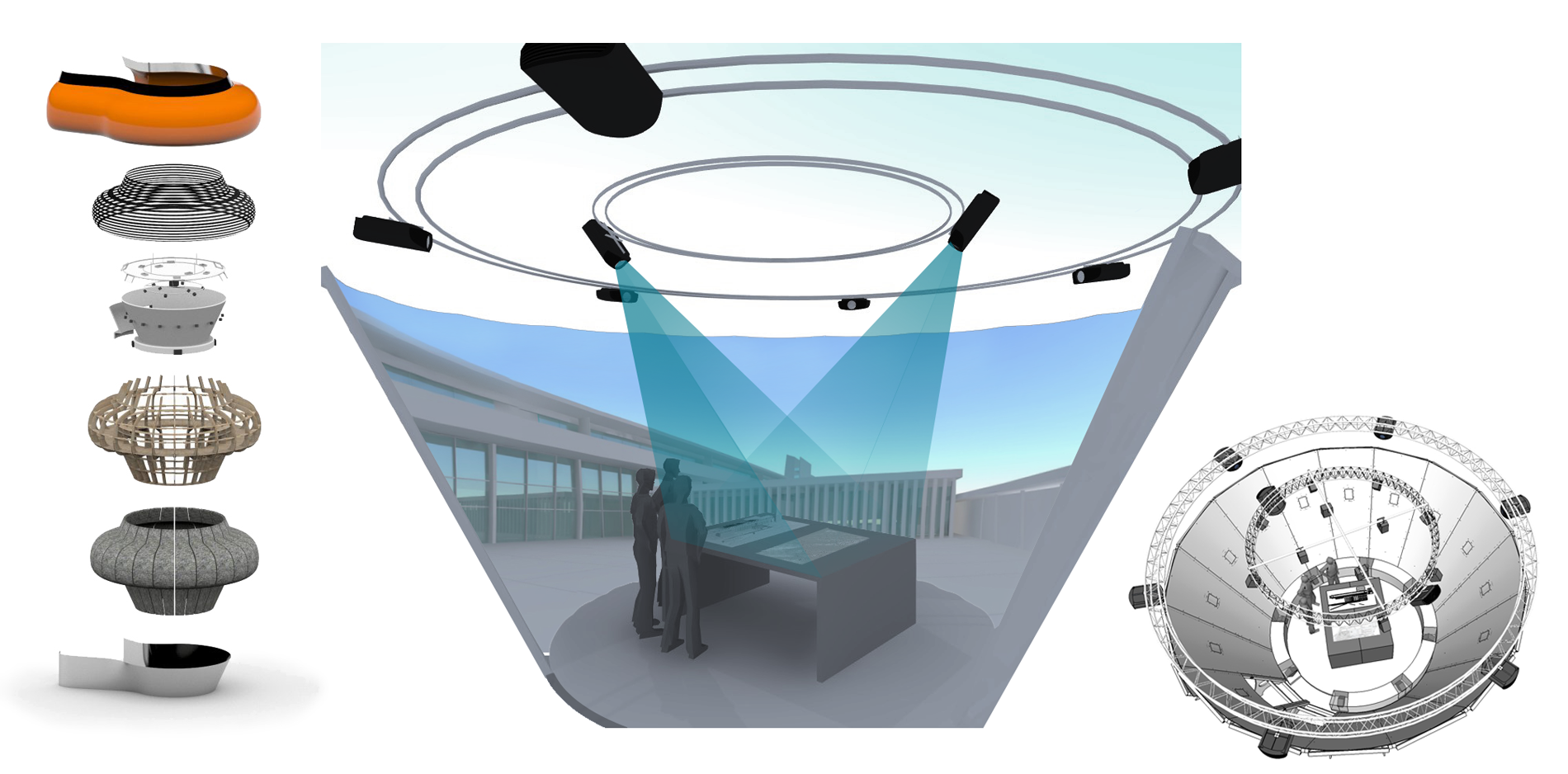
This research was lead as part of my PhD thesis. My project was financed to explore the implementation of a new Virtual Reality (VR) platform, Coraulis, as a pedagogic tool to support design education. I lead my research project in two phases. In the exploratory phase, I assessed the current tools and strategies used in design studios to teach design. In the second phase, I tested several VR systems in situ and assessed their benefits to develop a roadmap to implement Coraulis in design studios.
Find more about Coraulis
Credit: Amin Bouattour & alexandra Pasturel (left rendering) | Julie Milovanovic (right renderings)
The aim of my research was to define guidelines to implement a new tool as a pedagogic support for design critiques. To do so, I needed to get a better understanding of dynamics between instructors and students in during design critiques.
In this first phase, I questioned what were the pedagogic strategies instructors implement to teach design. I also explored what expectations students had in terms of feedback. During my interviews and direct observations, I assessed the type of tools used during critiques (mock ups, sketches, 2D plans, 3D models etc.) and how those influenced the interaction between tutors and students.
Phase 1 | Exploration of studio dynamic
Interviews and direct observations

Interviews

I conducted interviews with close to 30 students in design studios from undergraduate and graduate degrees. I gained insights on their expectations of studio critiques, the tools they use to represent and communicate their designs. I also interviewed instructors to better grasp their pedagogic strategies, their approach to teaching design, and their way to deliver feedback.

Direct observations

I observed each of the students I interviewed during four weeks of design studios. I captured their interaction with their instructors and assessed their performance through their weekly assignment grades. My interest was focused on identifying what type of media was mainly used for design critiques, from digital media to physical mock-ups or sketches.

Key takeaways

Students  need to have a flexible medium to present their designs. They navigate between digital and physical design representations easily. 
Students learn better from instructors' sketches.
Instructors are more comfortable sketching on paper than using digital medias.
In this second phase, I integrated a VR platform called HYVE-3D as a design tool and design critique environment. The HYVE-3D provides a social VR space to sketch in 3D thanks to the 3D Cursor to interact with the virtual environment. I compared the design critiques dynamics in the HYVE-3D to a traditional design critiques environment where students and tutors used paper plans, sections and mock-ups.
The metrics used to compare students' experience where their design collaboration with their instructors and their use of design representations.
Phase 2 | Testing the use of a VR platform in design studios
Direct observations and interviews
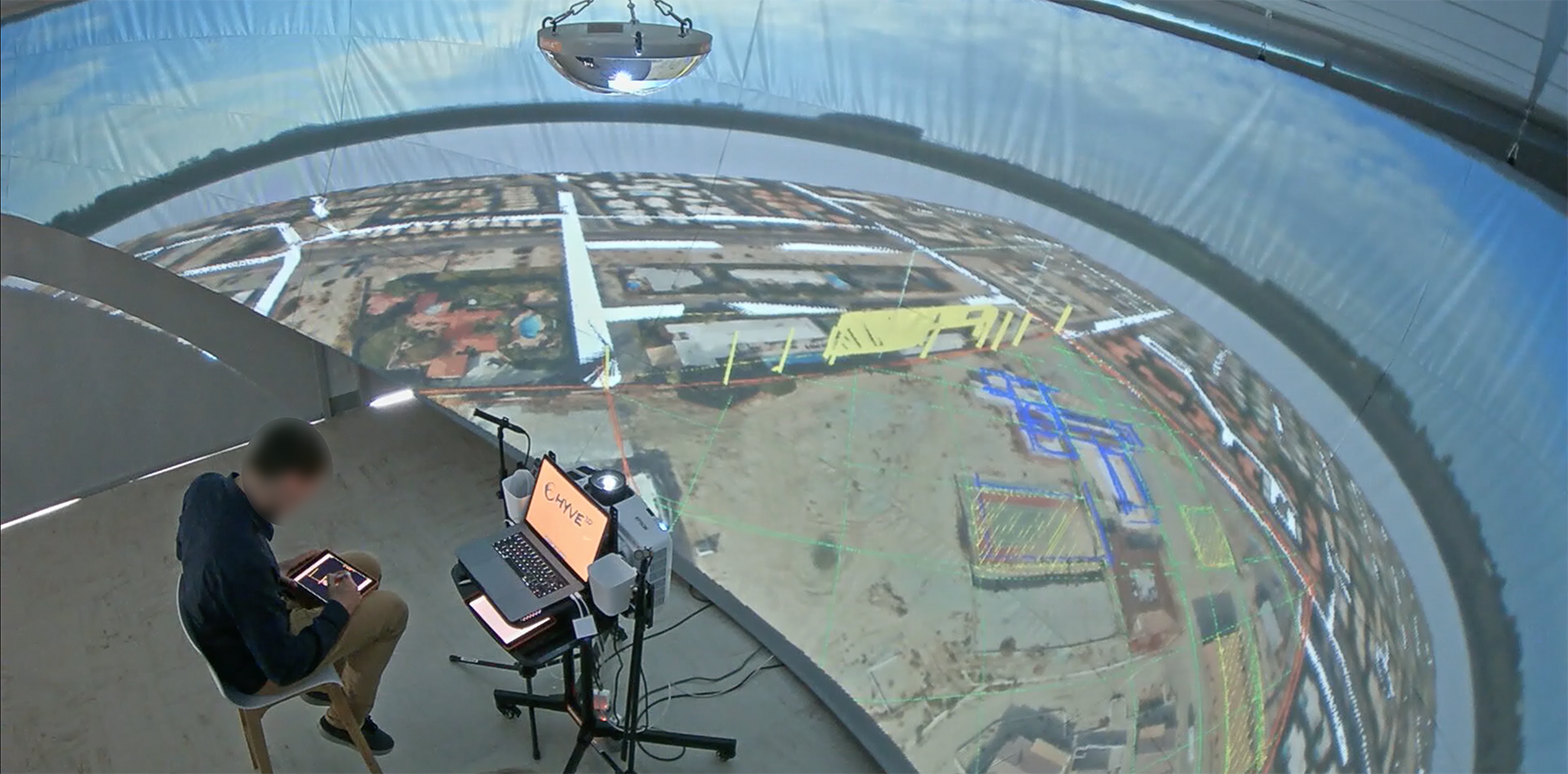
Studio session recorded in Bordeaux (2016)
Research questions

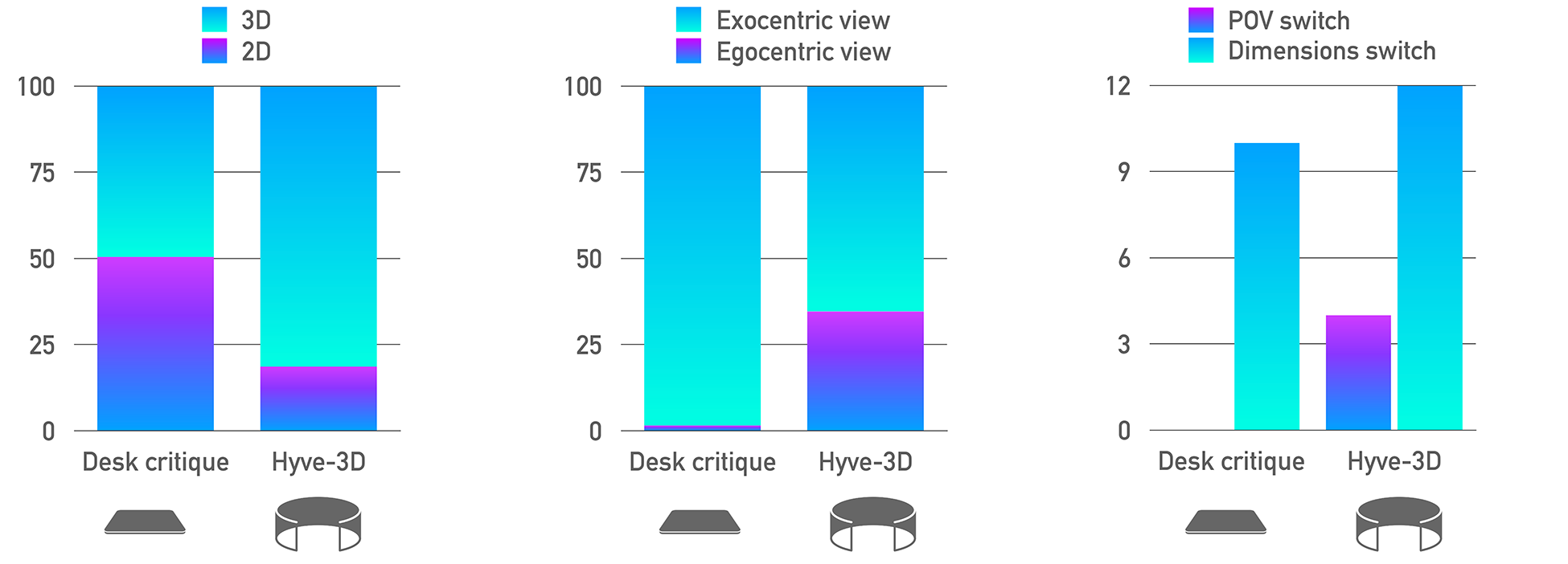
Does using the HYVE-3D improve switching between 2D and 3D, egocentric and exocentric views?
To what extent using the HYVE-3D facilitate design learning during critiques?

Interviews

I interviewed students following their experience of the HYVE-3D during a design studio session. The thematic analysis revealed some interesting key points. Students enjoyed the sketching interface for several reasons. Sketching is flexing as there is no need to enter precise measures (compared to Sketch Up). Students were able to sketch in 2D and view their designs in 3D, an important feature in architectural design workflow. Moreover, they noted that the collaboration with the tutor was enhanced as both are immersed in the student' s design. Here are some extract form the interview:

"Sketching gives a lot more flexibility to concept development which is really interesting. It doesn't exist in other software right now."
"The design becomes the discussion environment frame, it's the design that surrounds us, which is the artefact at the center of the relationship between tutor and student. In fact, the HYVE-3D erases this hierarchy between tutor and student."

Direct observations and video analysis

Each session (20 to 60 minutes) was video recorded to be further analyzed. A set of codes was determined a priori to measure design processes, collaborative patterns, and interactions with design representations. With the HYVE-3D, students relied more on the egocentric and 3D view than in the traditional desk critiques. When learning architectural design, taking the user perspective translates into exploring space at a first person view in 3D. Thanks to the HYVE-3D, students engaged more with their design using this point of view. Participants also switch from one type of representation to another more seamlessly in the HYVE-3D than in the desk critique environment.

Moreover, the collaboration between tutor and students increased while using the HYVE-3D. Collaborative design supports the development of design skills by doing design with a expert (here the tutor).

Key takeaways

Using a VR system like the HYVE-3D supports a better navigation of space by switching points of view (2D and 3D, egocentric and exocentric) during design critiques.
The HYVE-3D facilitates design learning during critiques by supporting co-design between tutors and students. The student's design becomes the frame of the design critique environment as tutors and students are immersed in it.

Education with super powers

Research and design
Project Overview
This solution aimed at alleviating challenges for educators to use technology in the classroom. The goal is to provide teachers with digital super powers, helping them create engaging content.
The aim of my research was to define educators problems and needs in order to develop a solution that could address it. In this first phase, I conducted interviews with several educators to better understand their pain point. The second phase focused on analysing existing solutions, and their limitations.
Phase 1 | Defining concept
Interviews with educators and market research

Key takeaways

Educators struggle to develop interactive learning content.
Sustaining learners' concentration is a challenge.
‍No easy way exists to create engaging interactive learning experiences. Competitors solutions are not flexible and not affodable.

The concept provides a web b.ase tool to transform power point presentation into Augmented Reality presentations. Users can easily repurpose their material and add 3D models to their slides. In presentation mode, the audience can visualize 3D content in AR on their phone
Phase 2 | Concept design
Prototyping
A digital tool to create AR presentations